
Flutter vs Unity for Mobile Games: How to Choose
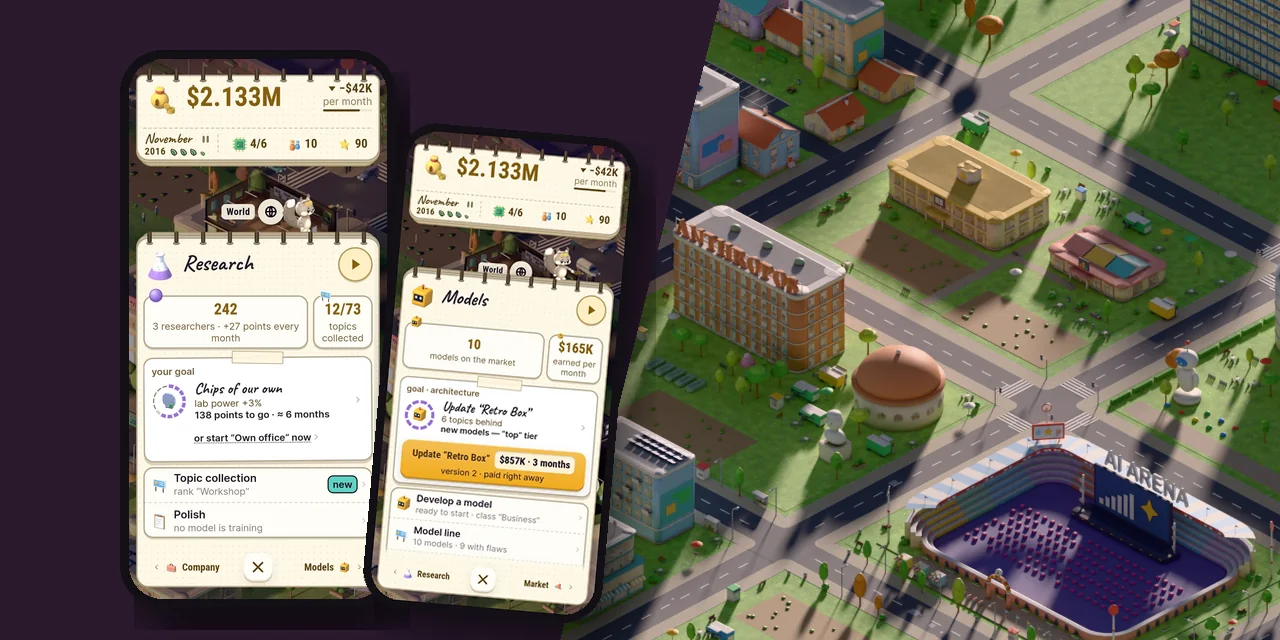
Flutter vs Unity comes down to what the player looks at. For 2D games where the player spends most of the time in the interface (tycoons, management sims, puzzles, card games), choose Flutter. For 3D, physics and large scenes, choose Unity. We work with both engines: AI Inc: Tycoon is built with Flutter, while our physics prototypes and PC projects use Unity 6. This guide covers when to use which, a point-by-point comparison and five questions to help you decide.
In short:
- Choose the engine based on what the player looks at the longest.
- If most of the screen is UI, numbers and text, go with Flutter.
- If you need 3D, joints, particles, or PC and consoles, go with Unity.
- In either engine, keep game logic separate from rendering. Then you can test it without a phone.
When Flutter is the better choice
When the game is the interface. In a tycoon the player reads tables, flips through sheets, compares numbers and taps buttons. That's exactly what Flutter was built for: automatic layout, text, scrolling, transition animations. A custom style is drawn with a plain CustomPainter, and changing the look takes minutes.
When you ship in many languages. Flutter's flexible layouts wrap long strings on their own, German ones for example. You can verify with widget tests that text never spills over the edge.
When tests matter. Game logic can be written in pure Dart with no Flutter imports at all. Those tests run on the Dart VM, with no phone or emulator. Our game has almost three thousand of them, and a full run takes minutes.
When you need lightweight 2D graphics. Flutter draws an isometric city with thousands of sprites through the Canvas API. How to hold 60 FPS while doing it is covered in our guide Flutter game performance.
When you can't do without Unity
3D and physics. Jointed characters, vehicles, destruction, custom shaders. As of October 2026, the 3D renderer for Flutter (flutter_scene) hasn't reached version 1.0, and we couldn't find any shipped games built on it.
PC and consoles. Unity builds for them out of the box; in Flutter it's an adventure of its own.
Ready-made tools. Mocap animation, particles, a scene editor, an asset store. For a 3D game that's weeks of work you don't have to write yourself.
The main mistake: choosing the engine for yourself, not the player
We tripped over this ourselves. At one point we started porting our tycoon from Flutter to Unity: art from Blender drops straight in, and C# felt more familiar. Within a week the Unity version was running. Then we locked in the final UI style — light, "paper-like", with hand-drawn speech bubbles. In Flutter it carried over one to one; in Unity every iteration cost several times more. So we went back to Flutter.
The takeaway for your choice: look at where the player spends their time. If the 3D world is a backdrop and the game happens in menus and tables, the interface decides.
Flutter vs Unity, point by point
- Language: Flutter uses Dart, Unity uses C#.
- 2D UI and text: a strength in Flutter; in Unity (uGUI, UI Toolkit) it takes more manual work.
- 3D, physics, shaders: mature and built in with Unity; possible in Flutter, but young.
- Android and iOS: both engines build from a single codebase. iOS builds can run in cloud CI, no Mac of your own required.
- Ads and purchases: in Flutter,
google_mobile_adsandin_app_purchase; in Unity, its own packages and the ad networks' SDKs. - Logic tests: possible in both. Easiest in Flutter: pure Dart on the VM.
- PC and consoles: Unity.
Five questions to choose an engine
- Does the game have a 3D camera the player can rotate?
- Do you need physics with joints, cloth or destruction?
- How much time does the player spend in the interface: menus, tables, dialogs?
- Do you need PC or consoles?
- What does your team already know, and what code will you have to maintain for years?
If the answer to 1, 2 and 4 is "no" and the answer to 3 is "a lot", Flutter will most likely get you there faster.
FAQ
Can you make a 3D game in Flutter?
Simple 3D, yes, but the tools are still young. For a commercial 3D game, Unity is the more reliable choice today.
Are Flame and Flutter the same thing?
No. Flame is a game engine on top of Flutter: game loop, components, collisions. For a game that is mostly interface, you don't need it: you can draw directly with the Canvas API.
Is Flutter fast enough for games?
For 2D, yes, as long as you keep an eye on expensive layers and color filters.
What should I use for a prototype?
The engine the game will live on. Rewriting a prototype from one engine to another almost always costs more than it seems at the start.
Not sure which engine fits your game? Write to us: we'll give you an honest answer, even if it's "you need a different team". We work with founders, studios and publishers on Flutter and Unity.