
Google Play Store Listing for Games: Screenshots Checklist
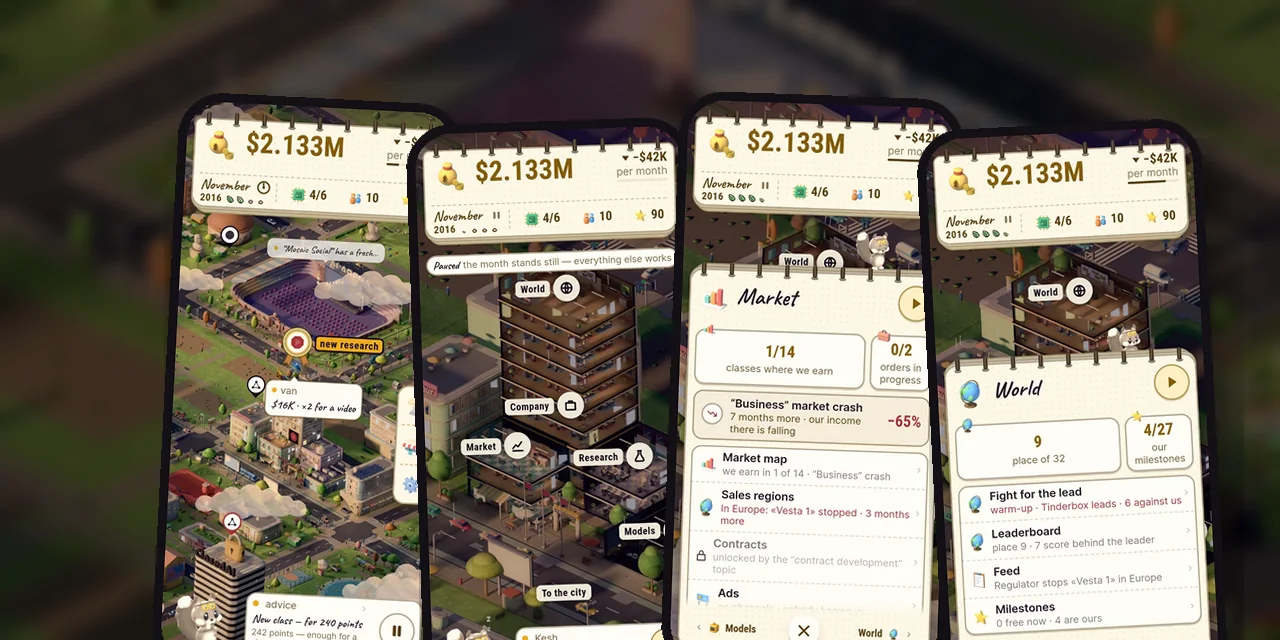
Your Google Play store listing works like a shop window: people look at the first frames and decide within seconds whether to tap "Install". So start with order, not decoration: the first three screenshots show the game's interface, captions are short, the feature graphic leaves its center free, and the video is vertical and opens with the game itself. Below are seven steps we followed on November 7 when we redid the listing of AI Inc: Tycoon: 8 screenshots, a feature graphic, texts and a video in 10 languages.
In short:
- The first three screenshots show the game's interface: they appear in Play search before anyone opens the page.
- One short caption per frame (2–5 words), no more than a fifth of the frame.
- Feature graphic 1024×500: the key part in the center, because the video play button sits on top of it.
- For a portrait game the video should be vertical; Play autoplays only the first 30 seconds, without sound.
- No "Best", "#1", "Top", "New", "Free", "Sale" or "Download now" on graphics and in video.
- Put version news in "What's new", not in the description.
Step 1. Plan three frames
First look at the listings of leading games in your genre. Don't copy: write down the patterns. Ours were: a short, large caption on every frame, all in one style; the first frame sells the game's main fantasy; characters poke out past the edge of the caption; there are "before → after" frames.
The first three frames should carry three different values. Ours are "Build your own AI company", "Grow from 2012 to 2050" and "One city, four seasons". The other five frames are built around those three.
Step 2. Shoot frames from the live game
Google's rules are simple: at least two and at most eight screenshots per phone, in 9:16 or 16:9. The first three should show the interface. So capture the real game instead of drawing a mock-up.
- Status bar: no carrier names or notifications, full battery and network.
- Language: if the listing is localized, each language gets its own set of frames with the interface in that language. We switch the language inside the game and shoot again instead of overlaying text.
- Holidays and promotions age fast on screenshots. When the event ends, the frame has to change. We deliberately left out frames with our Halloween event.
Step 3. Add a caption, but a single short one
A caption is 2–5 words, starting with a verb. You can highlight one word, but a highlighted phrase must not break across lines. Follow three rules:
- The caption takes no more than 20% of the frame.
- One style for the whole set: font, color, position.
- Large, high-contrast text with no small print, since it can't be read on a thumbnail anyway.
Ours looks like the top of a game sheet: a dotted paper card with brass rings. That way the frame immediately feels like the game rather than an ad.
Step 4. Design a feature graphic with a free center
The 1024×500 feature graphic sits above the listing, and if you have a video, the play button lies on top of it. So:
- put the key part in the center, and keep the very middle free;
- avoid a white, black or dark gray background;
- don't repeat the icon or the first screenshot;
- no device images or store badges.
Our graphic shows an evening city in golden hour, the studio's HQ on the right, Kesh in the corner and a paper card on the left. The 220×220 area in the middle is empty for the play button.
Step 5. Write the description: the main thing goes first
In the short description (up to 80 characters) put the genre and the promise. Ours: "Offline tycoon: grow a tiny AI startup into a tech giant and beat 31 rivals" is 76 of 80 characters. In the full description:
- the strongest points go in the first sentences;
- section headings in capitals, with no decorative symbols;
- don't repeat the short description in the full one;
- no keyword lists: Google's metadata policy forbids stuffing them into the description;
- put version news in "What's new" so the description doesn't go stale;
- every number must be true: we checked each one against the game's code.
The title (up to 30 characters) also has room for a genre word: ours in English is "AI Inc: Tycoon – Business Sim", 29 characters.
Step 6. Make the video vertical and "from the game"
Play autoplays only the first 30 seconds, without sound. Hence the rules for the clip:
- the game from the first seconds, not a logo or credits;
- at least 80% of the time is real gameplay;
- orientation matches the game: for a portrait game, a vertical video with no black bars;
- captions, because sound is often off;
- no "Download now" calls: they aren't allowed in a listing video.
Our trailer is 30 seconds, 1080×1920: clouds part, the city grows plot by plot, night falls, and at the end come the logo and the words "available now on Google Play". On YouTube, turn monetization off and keep access by link or public. A practical detail: the console accepts only links like youtube.com/watch?v=…, so convert a Shorts link.
Step 7. Measure, and don't rush
In Play Console open "Statistics" → "Compare with peers" and see how your listing's conversion compares with the median of games in your genre. But don't draw conclusions after a few days. When only a few hundred people visit the listing a month, the noise is several percentage points. We look at the difference no sooner than after two full months, and until then we answer every review and make sure the developer name on the page is the studio, not a personal name.
Checklist
- ✓ The first three frames show the interface and three different values.
- ✓ The caption takes up to 20% of the frame, one style across the set.
- ✓ A separate set of frames for each language.
- ✓ The feature graphic has a free center, no devices or store badges.
- ✓ The description opens with the genre and the promise, with no keyword lists.
- ✓ The video is vertical, shows the game from the first seconds, and has no "Download now".
- ✓ There is no "Best", "#1", "Top", "New", "Free" or "Sale".
- ✓ Conversion is compared with peers, and conclusions wait two months.
FAQ
How many screenshots does a game need on Google Play?
From two to eight per phone. We use eight, but the first three matter most: they appear in search before the listing is opened.
Can I write "free" on a feature graphic or screenshot?
No. Google's rules forbid words such as "Best", "#1", "Top", "New", "Free" and "Sale" on graphics and in video. The price is shown by the listing itself. More in Google Play's metadata policy and the help page on listing graphics.
Do I need separate screenshots for each language?
If you sell the game in different countries, yes: the interface in the frames should match the listing's language. We made 10 sets of 8 frames each.
When will I see a result after the redesign?
The first numbers appear within a week or two, but you can judge reliably only after two full months. Until then, watch the trend rather than single days.
Need help with your game's Google Play listing? We build it turnkey: frames from the live game, a feature graphic, texts and video in all languages. Read more on the services page. For publishers and studios there is cooperation with companies. And for how we went through closed testing before release, see the guide.